Raylight/Mac is now up to release 2.06. This release fixes a number of bugs. They are:
1. P2 Maker now automatically removes the file lock on LASTCLIP.TXT when you are writing directly to a P2 Card.
2. P2 Maker now writes continuous timecode into the video streams for all formats.
3. Fixed a problem with scanning DV-NTSC MXF files.
4. Fixed a problem where changing the quicktime folder where P2 Maker looks for quicktimes would cause the application to crash.
5. Fixed a problem where running the application out of a disk image or external drive would cause playback problems with link files made from MXF files on the system drive.
6. Fixed a problem where the "Store links with MXF files" option was ignored when scanning a folder in "More Scan Locations" which contained multiple card images.
Thursday, November 22, 2007


Wednesday, October 31, 2007
Raylight/Mac 2.04
Raylight for Mac 2.04 is released which fixes some problems with the P2 Card files generated by the P2 Maker function. When playing back clips made by Raylight in the HVX200 camera, you will no longer see the red "X" in the thumbnail view. You will however see a blue "E" which means the footage was edited.
Also we have fixed some problems with importing the MXF files into Avid Express Pro HD or Avid Media Composer, or Final Cut Pro 6 Log and Transfer. You can now take P2 Cards created with Raylight/Mac and import them into these programs.
If you are a registered user of Raylight/Mac get it at http://dvfilm.com/update
Also we have fixed some problems with importing the MXF files into Avid Express Pro HD or Avid Media Composer, or Final Cut Pro 6 Log and Transfer. You can now take P2 Cards created with Raylight/Mac and import them into these programs.
If you are a registered user of Raylight/Mac get it at http://dvfilm.com/update
Friday, October 5, 2007
Raylight for Mac 2
We've released version 2 of Raylight for Mac. Existing users can update their copy at dvfilm.com/update.
There are some important changes:
1. Raylight now supports the authoring of P2 Cards. You can actually write directly to a card by exporting a DVCPROHD quicktime from FCP, and it is automatically converted to an MXF file on the card. It also works with DVCPRO50, DVCPRO and DV.
2. The price for new users is now $195, we had to raise the price because of new development and support costs.
3. Raylight Mac now requires product activation. The activation process is simple and be done on any computer through one webpage, dvfilm.com/activate. The activation is keyed to each computer, so if you are using Raylight on multiple computers, you must purchase additional licenses (as was already required in the license agreement). Contact sales at DVFIlm.com for additional licenses or get them directly at DVFilmStore.com
There are some important changes:
1. Raylight now supports the authoring of P2 Cards. You can actually write directly to a card by exporting a DVCPROHD quicktime from FCP, and it is automatically converted to an MXF file on the card. It also works with DVCPRO50, DVCPRO and DV.
2. The price for new users is now $195, we had to raise the price because of new development and support costs.
3. Raylight Mac now requires product activation. The activation process is simple and be done on any computer through one webpage, dvfilm.com/activate. The activation is keyed to each computer, so if you are using Raylight on multiple computers, you must purchase additional licenses (as was already required in the license agreement). Contact sales at DVFIlm.com for additional licenses or get them directly at DVFilmStore.com
Thursday, October 4, 2007
Raylight for Windows 301-4 update available
A new version of Raylight for Windows, version 301-4, is now available.
This version updates the Vegas plugin to support Vegas Pro 8.
It also adds timecode support.
Registered users can request the update at this DVFilm site page
This version updates the Vegas plugin to support Vegas Pro 8.
It also adds timecode support.
Registered users can request the update at this DVFilm site page
Monday, September 10, 2007
Raylight with Vegas Pro 8
The Vegas plugin will be updated soon for V8. In the meantime Raylight can be made to work with Vegas 8 by using the following workaround:
http://dvfilm.com/cgi-bin/board/main.cgi?board=rayvegas;action=display;num=1188422584
http://dvfilm.com/cgi-bin/board/main.cgi?board=rayvegas;action=display;num=1188422584
Thursday, August 16, 2007
P2 Maker for Mac
In a few weeks, Raylight/Mac will be extended to support the authoring of P2 Cards from FCP. You will export a quicktime from FCP, and when it's finished, the P2 Maker "Drawer" (see screen grab here ) will open and allow you to create the P2 card with the movie clip on it.
This feature is planned for Raylight/Mac 2.0 and will be a free upgrade to all users!
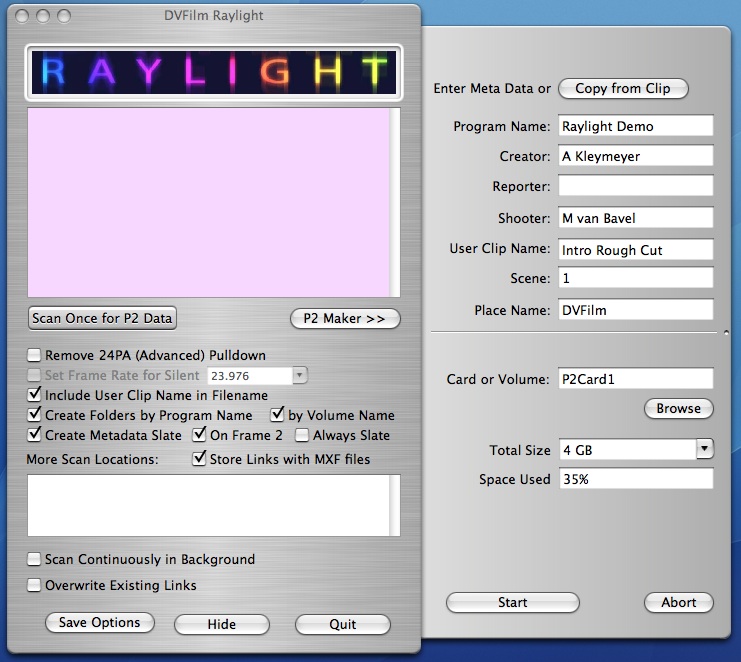
This feature is planned for Raylight/Mac 2.0 and will be a free upgrade to all users!
Saturday, August 11, 2007
Bug Release 1.07
Version 1.07 has been released, which introduces no new features but corrects a few problems with previous releases:
- Background scanning no longer logs diagnostic messages to the front panel. This was done to improve the reliability of background scanning and reduce usage of system resources. If a situation arises where is is necessary to view the diagnostic messages, it can be done with the "Scan Once" button.
- A problem was fixed with incorrect length of the audio tracks.
- The diagnostic window is always scrolled to the bottom after an option button is pressed or a scan is completed.
- The default options have been changed, so that the defaults for "User Clip Name", "Program Name" and "Store links with MXF Files" are now off. The reason for this is that these options can confuse new users of the program until they understand more about them. The defaults can be overriden by saving your own default options with "Save Options".
Subscribe to:
Posts (Atom)